


Popular searches
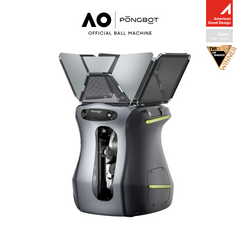
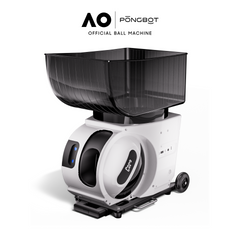
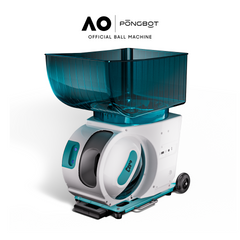
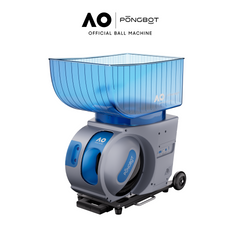



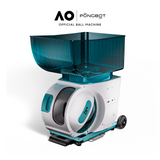
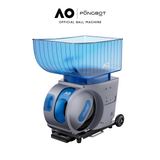

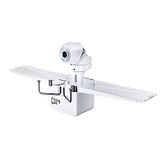


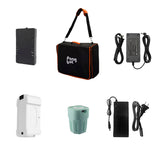
Smart Tennis Ball Machines
Hide filter
Sort by:
Clear all
Aura
$799.99 USD
Unit price
Regular price
$1,699.99 USD
Sale price
per
Options


Aura
$599.99 USD - $879.99 USD
Unit price
per
53%
OFF
Aura Series Dust Cover
$31.99 USD
Unit price
Regular price
$49.99 USD
Sale price
per
Color

Aura Series Dust Cover
$31.99 USD
Unit price
Regular price
$49.99 USD
Sale price
per
36%
OFF
Smart tennis ball machines turn solo practice into a repeatable, adjustable training session. Instead of relying on someone to feed balls, you can choose shot speed, spin, placement, and timing, then work through drills that target specific parts of your game. PONGBOT offers two approaches: Pace S for app-controlled, programmable training and Pace S Pro for advanced movement-responsive AI sessions. Compare what each model actually does, how smart drills work, and which machine suits your court routine.
15–80 mphListed ball-speed range on both Pace models
60 rpsMaximum spin rate
150 ballsHopper capacity
8 hoursListed battery runtime
Quick choice: Pace S is the practical pick for planned drills and stroke repetition. Pace S Pro adds player-position tracking, recovery-based feeding, and match-style challenges.
What Makes a Tennis Ball Machine Smart?
A conventional tennis ball launcher sends balls according to the speed, direction, spin, and interval you set. A smart tennis ball machine adds digital control and programmable training sequences, so you can change multiple shot settings without manually repositioning the machine between every drill.
Smart does not automatically mean artificial intelligence. App-controlled drills follow instructions you program. Movement-responsive AI uses information about your position to change how selected exercises unfold. That difference matters when comparing training features, not just marketing labels.
Programmable Smart Feeding
Build repeatable sequences for forehands, backhands, volleys, and movement patterns. Change pace, placement, spin, and feed interval to suit the session.
Adaptive AI Training
Use player-position tracking and responsive modes to practice recovering, reacting, and moving between shots rather than only anticipating a fixed sequence.
Smart Tennis Ball Machines vs Traditional Ball Launchers
Both machine types are useful. Fixed feeds are ideal for repeating a new stroke; programmable drills introduce varied placements; responsive training adds a movement-based challenge. Choose based on the practice problem you need to solve.
| Training feature | Basic fixed-feed machine | Programmable smart machine | Movement-responsive AI machine |
|---|---|---|---|
| Ball delivery | Typically fixed or preset patterns | Custom multi-shot sequences | Adaptive modes plus programmed drills |
| Control | Varies by model | App and remote on Pace S | App, remote, and tracking system on Pace S Pro |
| Best use | Repeatable contact practice | Targeted stroke and pattern work | Recovery, footwork, and rally simulation |
These are feature categories, not claims that every competing product has the same controls or capabilities.
How to Choose a Smart Tennis Ball Machine
Drill Variety and Customization
Look for more than a long preset list. Check whether you can change ball location, height, speed, spin, and timing for individual shots. A smaller set of well-designed drills may be more useful than hundreds you never use.
Feed Speed, Spin, and Timing
Low-speed feeds help with technique. Faster shots, topspin, backspin, and shorter intervals add difficulty. PONGBOT lists a 15–80 mph speed range, up to 60 rps spin, and a 1.5–12 second serve interval for its Pace models.
Power and Court Setup
Check battery runtime, machine weight, ball capacity, and transport needs. Pace S and Pace S Pro each list a 22 kg net weight and 150-ball capacity, so neither is an ultralight carry-on device.
Responsive Training Features
If you want the next feed to depend on where you recover, verify that the machine includes actual player tracking. App control alone cannot deliver that experience.
Compare PONGBOT Pace S and Pace S Pro
Both models share the core ball-delivery specifications. The major difference is the Pro model's additional movement-aware training system. Explore the official Pace S and Pace S Pro product pages for package options and current availability.
| Feature | Pace S | Pace S Pro |
|---|---|---|
| Preset drills | 396 | 564+ |
| Max speed | 80 mph | 80 mph |
| Max spin | 60 rps | 60 rps |
| Ball capacity | 150 | 150 |
| Battery | 8 hours listed | Up to 8 hours listed |
| Controls | App + remote | App + remote |
| AI movement tracking | No | Yes, with tracking accessories |
| Adaptive modes | Not included | Recovery Trigger, Adaptive Rally, Match Challenge, Arena of Dash |
Important: The 100 Hz tracking specification and four advanced AI modes belong to Pace S Pro, not Pace S. Runtime and drill counts are manufacturer-listed values; real-world results depend on settings and conditions.
Which Smart Tennis Ball Machine Should You Buy?
Beginners Building Consistent Contact
Choose Pace S. Start with slower, flat feeds to a single target, then introduce alternate placements and spin. You get repeatable practice without paying specifically for movement-tracking features.
Intermediate Players Training Patterns
Start with Pace S. Its preset and custom sequences support crosscourt rallies, directional control, approach shots, and transition practice. Choose Pro if you also want the feed to respond to your position.
Competitive Players Working on Recovery
Choose Pace S Pro. Recovery Trigger and Adaptive Rally introduce movement-aware exercises, while Match Challenge and Arena of Dash provide additional training formats.
Coaches and Training Facilities
Match the machine to the lesson. Pace S works well for planned feeding sequences. Pace S Pro adds responsive modes for footwork and rally scenarios, although coaches still need to provide technical feedback.
How Pace S Pro Makes AI Tennis Practice More Responsive
Pace S Pro uses a wearable P Tag S and two P Station S units for player-position tracking. PONGBOT lists a 100 Hz sampling rate and sub-10 cm tracking accuracy. These are manufacturer specifications, not a guarantee that every shot will land exactly where intended.
Recovery Trigger
Train the habit of returning to a designated recovery position before the next ball is launched.
Adaptive Rally
Use movement-responsive feeding to practice reacting and recovering through a sequence of shots.
Match Challenge
Work through simulated rally challenges with difficulty options described by PONGBOT across NTRP levels 1.0–7.0.
Arena of Dash
Practice agility and endurance in a challenge format with performance rankings.
These functions supplement traditional repetitions. They do not replace the technique corrections, tactical judgment, or personal observation a qualified tennis coach can provide.
Smart Tennis Drills to Try on Court
1. Forehand Consistency
Use a comfortable feed speed, no spin, and a single target. Aim for repeatable contact and balanced recovery before increasing pace.
2. Alternating Groundstrokes
Program forehand and backhand placements. Recover between feeds and focus on preparing early rather than hitting harder.
3. Short Ball and Approach
Combine a deeper ball with a shorter feed, then move forward for an approach or volley. Keep intervals long enough to move safely.
4. Recovery-Based Rally
On Pace S Pro, use Recovery Trigger or Adaptive Rally to connect hitting with repositioning. Adjust difficulty to your fitness and court space.
For every drill, prioritize accuracy and footwork before raising speed. Pause if fatigue causes rushed movement or unsafe technique.
Setup, Balls, and Everyday Maintenance
Start with a clear court, position the machine securely, and follow the supplied user manual for safe setup. Connect the app or use the remote, choose an appropriate drill, and begin at a manageable speed and interval. Pace S Pro movement-tracking modes also require the relevant tracking accessories to be set up correctly.
PONGBOT recommends pressureless balls for everyday machine training. Standard competition balls and ITF-approved balls are also supported, while low-compression balls are not recommended because of possible feeding inconsistency or jams. The official pressureless tennis balls 50-pack is one option for stocking regular sessions.
After training, collect loose balls, remove dirt and debris from the equipment as instructed in the manual, and store the machine dry. If you need compatible replacements or add-ons, check Pace Series Accessories rather than assuming third-party batteries or sensors are interchangeable.
Why Choose PONGBOT for Smart Tennis Training
PONGBOT offers a clear progression from programmable ball feeding to movement-aware AI practice without requiring buyers to confuse the two. Both Pace models provide app-based drill control, adjustable ball delivery, and a large hopper. Pace S Pro builds on that foundation with dedicated tracking hardware and responsive training modes.
For a broader view of the brand's lineup, browse tennis ball machines. If you are specifically researching adaptive systems, the AI tennis ball machines collection explains that category in more detail.
Build a Training Routine Around Your Goals
Choose the Pace model that matches your drills, court access, and interest in movement tracking. Check current bundles and delivery terms on the official product listings before ordering.
Explore Related Collections and Buying Guides
New to solo feeding? Explore tennis ball machines for beginners for a gentler starting point. If price is your main consideration, compare tennis ball machines under $1,500. You can also explore tennis training aids to plan a more complete practice setup.
For additional reading, see PONGBOT's tennis ball machine reviews and its deeper look at Pace S Pro AI practice features. These articles provide extra context beyond the collection comparison.
Frequently Asked Questions About Smart Tennis Ball Machines
Are smart tennis ball machines worth it?
They can be worthwhile if you practice alone regularly and want consistent feeds or repeatable drills. The value depends on how often you train and whether you will use the programmable features. AI movement tracking is most relevant when footwork and responsive rally practice are priorities.
What is the difference between a smart tennis ball machine and an AI tennis ball machine?
A smart machine can use app controls and programmable shot sequences. An AI model with player tracking can respond to your court position during supported modes. Not every app-controlled machine has adaptive AI.
Does Pace S have AI movement tracking?
No. Pace S supports app and remote control, preset drills, and custom programming. Pace S Pro adds movement tracking and four advanced adaptive modes.
Can beginners use a smart tennis ball machine?
Yes. Begin with slow feeds, a longer interval, and one predictable landing location. Add spin, movement, and varied placement only when you can recover safely and make consistent contact.
How fast do PONGBOT Pace machines shoot tennis balls?
The official specifications list a 15–80 mph ball-speed range for Pace S and Pace S Pro. Actual drill settings should be chosen for the player’s ability and training goal.
How many tennis balls fit in a PONGBOT Pace machine?
Both Pace S and Pace S Pro list a capacity of 150 tennis balls.
Can I control the machine from my phone?
Yes. Both Pace models list Bluetooth app pairing and physical remote control. Advanced movement-responsive modes are specific to Pace S Pro.
Can a smart tennis ball machine replace a coach?
No. A machine is useful for repeated feeding and structured practice, while a coach can observe mechanics, give personalized feedback, and help with tactics.
What tennis balls should I use?
PONGBOT recommends pressureless tennis balls for regular machine practice and supports standard competition balls. It advises against low-compression balls because they may cause inconsistent feeds or jams.


