










This PongBot tennis ball machines review pulls together hands-on testing from four YouTube creators: two tennis coaches, a recreational player, and a touring pro.
Three tested the Pace S Pro, and one took a first look at the new multi-sport Aura. We summarize what each one found, the pros and cons they agree on, and which PongBot model fits which player.
- All three reviewers praised feed accuracy and the flexibility of custom drills.
- Two reviewers trained around two hours per session without battery trouble.
- Rolling it like luggage made transport easy, even on foot.
- The app takes time to learn, and the remote felt less intuitive to one reviewer.
- Opinions on the smart tracking modes were mixed. Advanced players preferred custom drills.
- An early look at the 7 kg Aura showed clean feeds for tennis and pickleball.
PongBot Tennis Ball Machines at a Glance
PongBot makes app-controlled tennis ball machines. Three of the four reviewers tested the Pace S Pro, the brand's flagship, and one tried the new Aura. Here's how it compares with the other tennis models.
| Model | Best for | Key features | Current price |
|---|---|---|---|
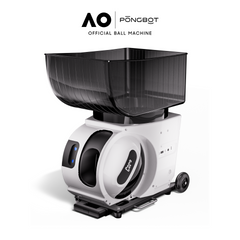
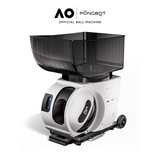
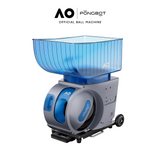
| Pace S | Programmed and custom drills on a budget | 80 mph, 60 rps spin, 150 balls, up to 8 hours, 396+ preset drills | $999.99 |
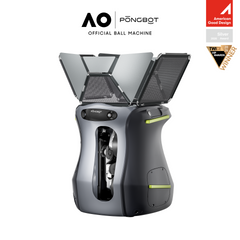
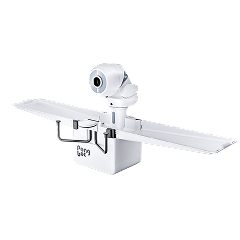
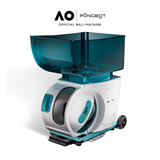
| Pace S Pro | Players who want movement-based training | Same hardware as Pace S, plus tracking sensors, four smart modes, and 564+ preset drills | $1,219.99 |
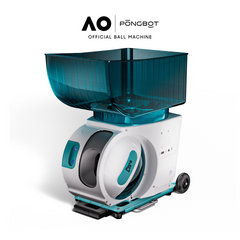
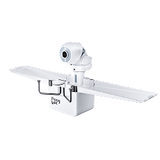
| Aura | Players who also play pickleball or padel | Lightweight multi-sport machine (7 kg). Comes set for one sport, and adding others costs extra. | From $599.99 |
Specs and prices from PONGBOT product pages, October 2026. Prices change often, so check each product page.
Coach Adrian's Review
Coach Adrian tested the Pace S Pro for about a month, both for personal hitting and in tennis classes. Adrian says PongBot sent the machine free for review, but the video isn't sponsored and the company didn't preview it.
What Coach Adrian Liked
- Placement accuracy. From the center of the baseline, Adrian could hit deep corners, short angles, drop shots, and topspin lobs.
- Custom drills. Adrian built multi-ball patterns that mixed spins and depths, and named accuracy and custom drills as the two things that put it ahead of other machines.
- Quick setup. Downloading the app, creating an account, and connecting by Bluetooth took little time.
- App range. Drills could be run from the back fence without walking to the net.
- Portability. It's compact, fits a small car trunk, and rolls well on court, concrete, gravel, and grass.
- Detachable battery. You can charge it indoors while the machine stays in a shed or car.
- Battery life. After about two hours of use, three of four battery bars were still lit.
- Easy cleaning. A compartment lets you clear out ball fuzz and debris.
What Coach Adrian Didn't Like
- Learning curve. Expect to spend some time learning the app before it feels natural.
- Recalibrating. Moving to a different court sometimes meant small adjustments to hit the same spots.
- Smart features. In Adrian's testing, Recovery Trigger and Adaptive Rally sometimes paused or fed unevenly, which broke the rhythm of a rally.
- Remote. Adrian found the remote less intuitive than the app.
- Phone battery. Adrian's older iPhone drained faster during long sessions.
- Ball hopper. The hard plastic hopper scuffed when taken on and off. Adrian called it the machine's biggest design flaw.
- Long-term worries. Adrian wondered how well it would handle a drop and how long the app will be supported.
Coach Adrian's verdict: Despite the cons, Adrian rated it the best ball machine they've used, ahead of several other brands in their collection. The recommendation is for players who are open to using an app, and not for those who want simple dials and buttons.
Courtside Sush's Review
Courtside Sush, host of The Fifth Set, tested the Pace S Pro as a recreational player. Sush discloses using an affiliate code that earns a small commission from sales.
Highlights From Courtside Sush's Testing
- Community drills. Sush liked browsing drills other players shared and starting one right away. Searching "volley" brought up plenty of net drills.
- Feed consistency. Sush noted how reliably balls arrived at the same spot, which made repetition easy.
- Match prep. Sush uses it to warm up before tournament matches and to work on weaknesses, such as the overhead.
- Portability without a car. Sush rolls it about 10 minutes on foot to the club and back.
- Training with a partner. One person hits while the other collects balls and gives feedback.
Courtside Sush's verdict: Of the ball machines Sush has used, this is the favorite. Sush also ran it from a phone after the remote's battery ran out, and expects that's how most people will use it.
SeanPlaystennis's Review
Sean is a professional player who tested the Pace S Pro over several months, and admits to first expecting it to be a gimmick.
What Changed Sean's Mind
- Training freedom. Sean can train morning, afternoon, or evening without arranging a coach or hitting partner.
- More reps. Sean trains with it about 1.5 to 2 hours a day and has hit far more balls since.
- Precise custom drills. Sean mostly skips preset drills and builds custom ones, setting spin, speed, and landing point.
- Fitness. Movement-heavy drills helped conditioning as well as strokes.
Sean's Practical Tips
- Shorten the feed time. Sean found a 1.5 to 2 second gap between balls felt more realistic than longer gaps.
- Try the three-forehand drill. First forehand from the forehand corner, second from the middle, third from the backhand corner. Sean does three sets, then rests.
- Move the machine for down-the-line work. For the pyramid drill, Sean places it in the forehand corner.
- Use Adaptive Rally if you're newer. Sean found it takes a few minutes to calibrate and suits beginner and intermediate players, but prefers custom drills personally.
Sean's verdict: Sean would fully recommend it to anyone who wants to hit more balls on their own schedule.
Rahul's First Look at the Aura
Rahul, a tennis coach, tried PongBot's new Aura multi-sport machine at the RacquetX expo in Fort Lauderdale. PongBot invited Rahul to test it, and the team set up the drills. The unit was a prototype, so the final version may differ.
What Stood Out
- Light and compact. At 7 kg, it carries by a handle or arm strap and fits in any size car. Rahul had found the Pace S Pro powerful with great feed quality, but on the bigger side.
- One machine, three sports. The gap between its two launch discs adjusts to the ball, so it can feed tennis, pickleball, or padel balls.
- Clean feeds. Rahul noticed no lag, no pace issues, and no random spin while hitting.
- Pickleball surprise. Rahul expected plastic pickleballs to feed poorly, but they fed well.
- Custom drill on request. The team quickly built a drill Rahul uses with advanced students: crosscourt backhand, crosscourt forehand, approach forehand, two volleys, and a smash.
- Fold-open basket. The prototype's basket held about 100 balls.
Features Rahul Didn't Test Yet
The PongBot team described several features that weren't part of the hands-on session. These include motion tracking with voice guidance, AI form feedback using the front cameras, planned voice control, and an "Upload a Match" feature. Rahul plans a full review of the final version.
Rahul's first impression: From a performance standpoint, Rahul came away very impressed, especially with the multi-sport feeder.
Pros and Cons Across the Reviews
Looking at the reviews together, a few themes stand out.
| Topic | What reviewers found | Verdict |
|---|---|---|
| Feed accuracy | Consistent, precise placement to corners, short balls, and lobs | Strong pro |
| Custom drills | Highly flexible, plus shared community drills | Strong pro |
| Battery | About two-hour sessions with charge to spare | Pro |
| Portability | Rolls like luggage, fits small trunks, has some weight | Pro |
| Setup | Quick app and Bluetooth connection | Pro |
| App learning curve | Takes time to learn the menus | Con for some |
| Calibration | May need small adjustments on a new court | Minor con |
| Smart tracking modes | Useful for some, uneven timing for others | Mixed |
| Remote | Works, but one reviewer found it less intuitive | Mixed |
| Ball hopper | Plastic scuffs when removed often | Con |
| Multi-sport option (Aura) | Early prototype fed tennis and pickleball balls cleanly at 7 kg | Promising |
Pace S or Pace S Pro
Both models share the same speed, spin, ball capacity, and battery. The Pro adds movement tracking and four smart modes: Recovery Trigger, Adaptive Rally, Match Challenge, and Arena of Dash.
The reviews offer a useful clue here. Two of the three Pace S Pro reviewers leaned on custom drills more than the smart modes. If that sounds like you, the Pace S gives you the same feeding hardware for less money. If you want training that reacts to your movement, the Pro is worth a look.
Who Should Buy a PongBot
Based on these reviews, PongBot machines suit players who want structured solo practice and don't mind using an app.
- Good fit. Players who train alone often, coaches who want repeatable drills, and anyone who enjoys building custom patterns.
- Good fit. Players without a car who need a machine they can roll to the court.
- Good fit. Players who split time between tennis, pickleball, and padel, who may prefer the lighter Aura.
- Think twice. Players who want a machine run entirely by dials or buttons on the unit.
- Think twice. Players who mainly want smart tracking modes and expect them to feel like a live hitting partner.
Tips to Get the Most From a PongBot
- Give the app 30 minutes before your first session. Learning the menus at home makes court time smoother.
- Calibrate when you change courts. Small adjustments keep balls landing where you expect.
- Shorten the feed interval as you improve. Faster feeds feel more like real rallies.
- Handle the hopper with care. Lift it on and off gently to reduce scuffing.
- Use the recommended balls. PONGBOT recommends pressureless tennis balls for daily training.
- Charge the remote too. One reviewer's remote ran flat mid-session.
Common Mistakes New Owners Make
- Expecting plug-and-play buttons. These machines are built around the app.
- Standing still for every drill. Reviewers got the most from drills that make you move.
- Skipping calibration. A small tweak fixes most "it's landing off" complaints.
- Judging the smart modes on day one. They take a few minutes to set up and calibrate.
- Ignoring the drill library. Shared drills are a fast way to find new patterns.
Frequently Asked Questions
Is PongBot a good tennis ball machine?
Based on the three independent reviews covered here, yes, for players comfortable using an app. Reviewers praised its accurate feeds, flexible custom drills, long battery life, and easy transport. The main drawbacks were the app learning curve, occasional recalibration, and mixed results with the smart tracking modes. One coach called it the best machine they've used.
Should I buy the Pace S or Pace S Pro?
Both share the same speed, spin, ball capacity, and battery life. The Pace S Pro adds movement tracking and four smart training modes, and costs more. If you mainly plan to run custom or preset drills, the Pace S may be enough. If you want training that responds to your movement, choose the Pro.
How long does the PongBot battery last?
PONGBOT lists up to 8 hours of battery life for the Pace S and Pace S Pro. In real use, two reviewers trained for about two hours per session without issues. One coach still had three of four battery bars after about two hours. The battery is detachable, so you can charge it away from the machine.
Is a PongBot easy to transport?
Reviewers found it easy to move. It has a pull-out handle and wheels, so it rolls like luggage on courts, concrete, gravel, and grass. One reviewer rolls it 10 minutes on foot to the club. It does have some weight, so lift it carefully into a car or onto a shelf.
Do you need the app to use a PongBot?
The machines come with a remote, but reviewers found the app is the main way to use them. The app is where you build custom drills, browse shared drills, and set up smart modes. One coach found the remote less intuitive, while another reviewer ran everything from a phone.
What is the PongBot Aura?
The Aura is PongBot's lightweight multi-sport ball machine, weighing 7 kg. Its launch discs adjust to the ball, so it can feed tennis, pickleball, or padel balls. In an early hands-on test of a prototype, coach Rahul found the feeds clean for both tennis and pickleball. It comes set for one sport, and adding others costs extra.
The Verdict From Real Testers
This PongBot tennis ball machines review shows a clear pattern. Accuracy, custom drills, battery life, and portability won over coaches, a club player, and a touring pro, and an early look at the Aura adds a lighter multi-sport option. Expect a short learning curve with the app, and choose the Pace S or Pace S Pro based on whether you'll use the smart modes.

Movement tracking, four smart modes, and 564+ preset drills.
$1,219.99 $1,999.99

Same 80 mph speed and 60 rps spin, with 396+ preset drills.
$999.99 $1,699.99

Trains tennis, pickleball, or padel. Weighs only 7 kg.
$599.99 $1,199.99
Keep Reading


